What Our Research Found
The question we set out to answer is simple: at $21.99, what does a buyer actually give up compared with a $60 Razer Goliathus Extended Chroma or a $30 unlit SteelSeries QcK XXL? RGB desk mats are one of the most commoditised categories on Amazon, and the spec sheets are nearly identical from brand to brand, so the differences show up in dimensions, cable placement and how the thing holds up after six months.
Depth is the number that decides this purchase. Twelve inches sits at the shallow end of the big-mat class, and the 400 mm-deep 3XL pads that low-sensitivity players tend to buy give you nearly four more inches of vertical room. If your arm sweeps, that gap is the whole review.
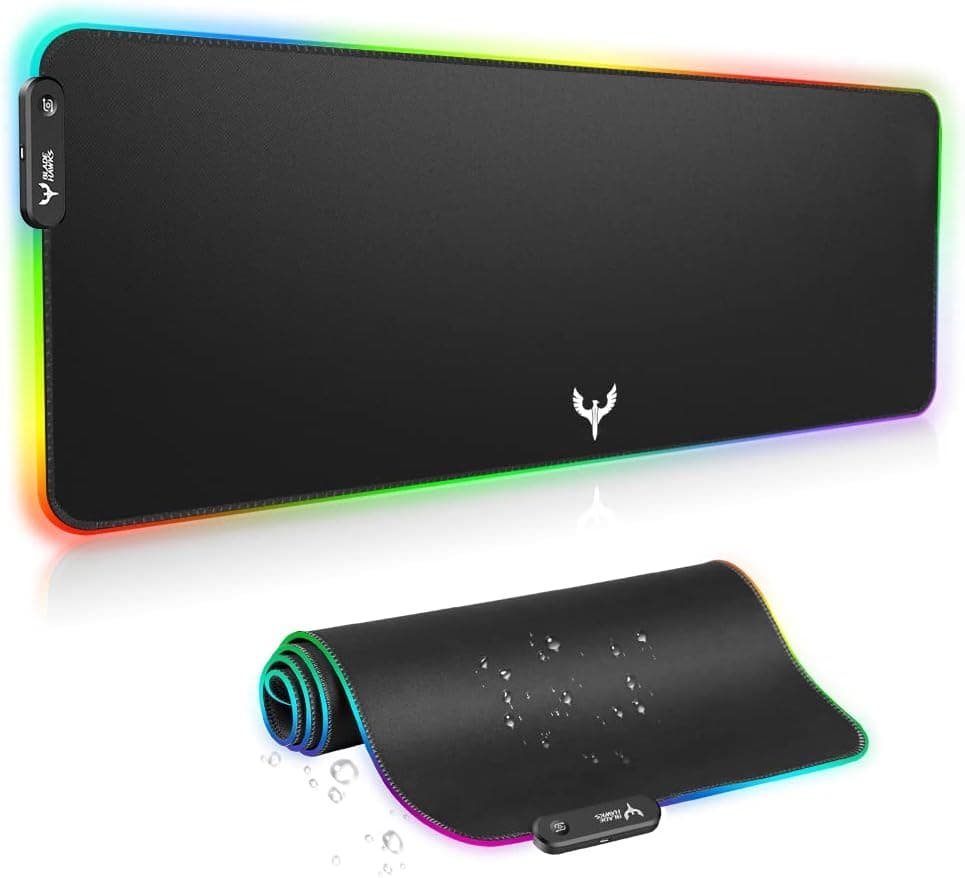
At 31.5 x 12 inches (800 x 300 mm), the Blade Hawks covers a full-size keyboard plus roughly 12 to 13 inches of mouse width on a standard desk. Thickness is listed at about 4 mm, so it sits above the 2-3 mm budget norm: enough to smooth out an uneven desk without feeling spongy under a click. The lighting is edge-only. LED strips under the stitched border throw colour outward and onto the desk rather than up through the cloth. Modes are advertised at 14, cycled with an inline button on the USB cable, with no driver, no app, and no handshake with Razer Chroma, Corsair iCUE or ASUS Aura. Whether the pad remembers your last mode after a power cycle is undisclosed by the listing, and owner reports on that point are inconsistent. Power comes over USB-A at 5V. Blade Hawks doesn't publish a current figure and we didn't meter one. Our rough assumption, based on how strips of this length usually behave, is that draw lands somewhere in the low hundreds of milliamps. Treat that as an educated guess rather than a documented spec.
Bottom line
For $21.99 you get a competent large cloth pad with a lighting gimmick attached. The surface glide is mid-fast and works fine with common optical sensors, and the rubber base doesn't slide on wood or laminate. The compromises are real but predictable: shallow depth, fixed cable exit, no software control, and a mat you can only spot-clean because there's wiring in the border.
It genuinely suits a mid-size desk where a deeper mat wouldn't fit anyway, and gamers who play at 800-1600 DPI. If you play at 400 DPI with big arm sweeps, or you already own a synced RGB setup and want the desk to match it, spend the extra money elsewhere.
How do you judge a mouse pad without lab data?
There's no meaningful lab science for a mouse pad, so we assessed it the way a careful buyer should: against the specs that decide real-world fit. That means measured surface area versus the category standard (400 x 900 mm is common in the XXL/3XL class; this is 300 x 800 mm), thickness against the 2-4 mm norm, base material and edge construction, and how the lighting is controlled. On the electrical side, the pad is a USB bus-powered accessory running at 5V. Blade Hawks doesn't publish a current figure and we didn't measure one, so any number we gave would be an assumption rather than a finding. Our working guess is that a strip this length draws well under the 500 mA a USB 2.0 port supplies, but that's an estimate we can't back with a datasheet, and we're not going to dress it up as one.
The Good & The Bad
thumb_up What We Loved
- check
Size-per-dollar is hard to beat
You're paying roughly a third of a Razer Goliathus Extended Chroma's price for a similar amount of covered desk. The light show is worse. The real estate isn't.
- check
Stitched edges on a budget pad
Fraying is the number one way cheap cloth pads die. The sewn border here also carries the LED strip, so the same seam that protects the cloth is what diffuses the glow.
- check
No software, no account, no bloat
Plug it in and press a button. You're not installing a 400 MB RGB suite that runs at startup just to make a desk mat glow, which is a genuine advantage over ecosystem-branded pads.
- check
Grippy base and neutral glide
The rubber underside stays put on hard desks, and the micro-woven surface sits in the mid-fast range, fine for 800-1600 DPI play with mainstream optical sensors. It isn't a control-focused speed cloth and doesn't pretend to be.
thumb_down Honest Drawbacks
- close
Vertical room runs out fast at low sensitivity
Twelve inches is fine until you're pulling recoil down or tracking across a whole screen at 400-800 DPI. That's when you feel the front edge under your palm. Players who buy 400 mm-deep 3XL mats do it for those extra four inches of sweep, and you don't get them here.
- close
The RGB is decorative, not functional
Edge-only glow with no brightness adjustment, no per-zone editing and no ecosystem integration. In a bright room the effect mostly washes out. If lighting is your reason for buying, this is where the $22 shows.
- close
Fixed cable exit and a permanently occupied USB port
The lead comes out of one corner and can't be repositioned, so a PC on the wrong side means routing cable across the desk. There's also no USB pass-through, unlike the Corsair MM700 RGB, so that port is gone for good.
- close
Not washable, and durability reports vary
Wiring in the border rules out machine washing, leaving spot cleaning only on a mat that lives under your hands. A recurring minority of owner reports describe an LED segment going dark or the lighting failing inside the first several months, and the warranty terms aren't clearly published.
- close
Ships tightly rolled and takes days to flatten
Corner curl in week one is the single most common early complaint, and it's avoidable only by weighing the mat down for a day or two before you use it.
- close
Mode memory after power-off is undisclosed
Blade Hawks doesn't state whether the pad remembers your last lighting mode when the PC powers down, and owner reports on that point contradict each other.
Technical Breakdown
Surface dimensions
31.5 x 12 in (800 x 300 mm)
Thickness
Approx. 4 mm (0.16 in)
RGB control
14 advertised modes, inline button only
Power input
USB-A, 5V (current draw undisclosed)
Base and edges
Textured rubber base, stitched border
How It Works
Setup takes under five minutes, but there's one step almost everyone skips and then complains about.
Unroll it and let it flatten
The pad ships tightly rolled. Lay it flat, rubber side down, and weigh the corners with books for 24 to 48 hours. Skipping this is why so many owner reviews mention curling edges in week one.
Position the cable before you commit
The USB lead exits from one corner and can't be moved. Decide whether your PC sits left or right of the desk before you settle the pad, because rerouting later means lifting the whole keyboard and mouse.
Plug into a USB-A port
Any 5V USB-A port works: motherboard, hub or powered monitor. There's no driver to install. The LEDs light as soon as power is applied.
Cycle modes with the inline button
Short presses step through the lighting modes, and on most units a long press turns the lighting off while leaving the pad powered. No app, no brightness slider, no per-zone control.
Clean by hand only
Spot-clean with a barely damp cloth and mild soap, then air dry fully. Don't submerge it or machine wash it, because the LED strip and wiring are sealed inside the border seam.
How It Compares
| Feature | Blade Hawks Extra Large RGB Gaming Mouse Pad (31.5 x 12 Inch) | Typical Alternative |
|---|---|---|
| Price | About $21.99 | SteelSeries QcK XXL: ~$35-40; Razer Goliathus Extended Chroma: ~$60-70 |
| Dimensions | 31.5 x 12 in (800 x 300 mm) | 35.4 x 11.8 in (QcK XXL); 36.2 x 11.6 in (Goliathus Extended); 47 x 15.75 in on 3XL-class mats |
| Thickness | Approx. 4 mm | 3-4 mm on most cloth extended mats |
| Lighting | Edge RGB, 14 advertised modes, button cycle | cancelNone on QcK XXL; full Chroma software sync on Goliathus |
| Software sync | cancelNo, not compatible with Chroma, iCUE or Aura | check_circleYes on branded RGB pads; N/A on unlit pads |
| USB pass-through | cancelNo | check_circleYes on Corsair MM700 RGB (2-port hub) |
| Washable | Spot clean only (electronics in border) | Unlit cloth pads are typically hand-washable |
| Warranty | cancelNot clearly published; Amazon return window applies | 1-2 years on SteelSeries, Razer and Corsair pads |
Frequently Asked Questions
Is the Blade Hawks extra large RGB mouse pad worth it under $25?
Yes, if you want a large desk mat under $25 and you treat the lighting as a bonus. You get 31.5 x 12 inches of stitched-edge cloth with a grippy rubber base for about $21.99, roughly a third the price of a Razer Goliathus Extended Chroma. Buy it for the surface, not the RGB.
Does the Blade Hawks RGB sync with Razer Chroma, Corsair iCUE or ASUS Aura?
No. An inline button on the USB cable cycles through the advertised 14 modes, and that's the entire control scheme. There's no driver, no app, no brightness adjustment, and no ecosystem hooks at all. If your desk needs to match a synced Chroma or iCUE setup, this pad can't join in.
Is a 12-inch deep mouse pad enough for low sensitivity FPS gaming?
At 800-1600 DPI, 12 inches of vertical space is fine for most players. Drop to 400 DPI with low in-game sensitivity and you'll hit the front edge partway through a wide sweep, which is precisely why 3XL mats run 15.75 inches deep. Measure your usual sweep before ordering.
Can you wash an RGB mouse pad with LEDs in the border?
Not in a machine, and not by submerging it. The LED strip and its wiring sit sealed inside the stitched border, so water reaches the electronics. Spot-clean with a barely damp cloth and a little mild soap, then let it air dry completely before you plug the USB lead back in.
Blade Hawks vs SteelSeries QcK XXL — which is the better buy?
The QcK XXL is the better mousing surface. The Blade Hawks is the better value. SteelSeries gives you a longer 35.4-inch mat, more consistent cloth quality and a published warranty for $35 to $40. Blade Hawks costs about $22 and adds edge lighting, with no software control and vague warranty terms.
What's the return policy on Amazon Canada for this mouse pad?
Thirty days from delivery covers most items sold on Amazon.ca, and that window is your real protection here. Blade Hawks doesn't clearly publish a manufacturer warranty for this model. Test every lighting mode in the first week rather than discovering a dead segment in month four.
library_booksReferences & Further Reading
Our reviews are informed by peer-reviewed research and authoritative health organizations. These sources provided context for this review:
- linkUSB Implementers Forum — USB power delivery and bus-power specifications
- linkFCC — Equipment Authorization process for electronics sold in North America (general background only; we did not verify an FCC ID for this specific model)
- linkAmazon.ca — Returns and refunds policy
Editorial note: Links to external sources are provided for informational purposes. ReviewHubNow is not affiliated with these organizations and does not receive compensation for linking to them.
Judged as a $22 desk mat that happens to glow, the Blade Hawks earns its 4.6-star average. The cloth surface is neutral ...
Based on our research and analysis, Blade Hawks Extra Large RGB Gaming Mouse Pad (31.5 x 12 Inch) scored 7.4/10. See the full verdict above for who it suits — and who should pass.
View Price on Amazon Canadaarrow_forwardVerify official availabilityWhat Owners Report
Recurring themes we found across public owner reviews.
Buyers repeatedly say the size-to-price ratio is the main draw: it covers most of a standard desk, the colours are brighter than expected in a dim room, and it works the second you plug it in with nothing to install.
A large share of critical reviews describe the pad arriving tightly rolled and curling at the corners for the first several days, plus frustration that the USB cable exits from a fixed corner that doesn't suit every desk layout.
A minority but persistent group of owners report the lighting dimming, one segment going dark, or the RGB failing entirely within the first year, while the cloth surface itself holds up fine, which suggests the LED wiring is the weak link rather than the pad.
Covered by Amazon.ca's standard 30-day return window for most items. Blade Hawks does not clearly publish a separate manufacturer warranty period for this model — check the store listing before assuming longer coverage, and test every lighting mode within the return window.